


MD339 Digital watch face
4.452.00 Reviews
App Specs
- Version
- Varies with Device
- Updated On
- License
- $2.99
- Downloads
- 10,000+
- Developer
- Matteo Dini MD ® Watch Faces
- Categories
- Personalization
- Platform
- Android
Screenshots
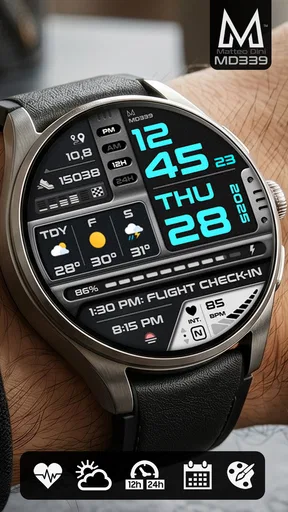
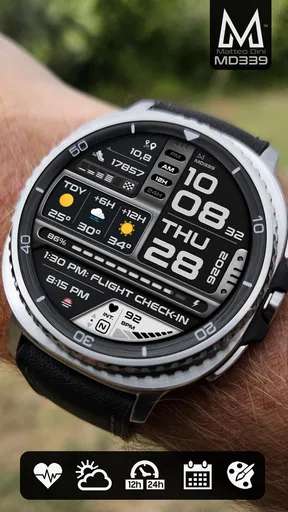
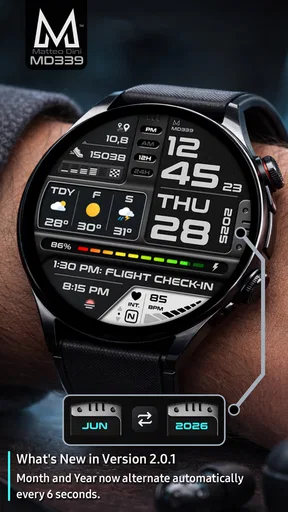
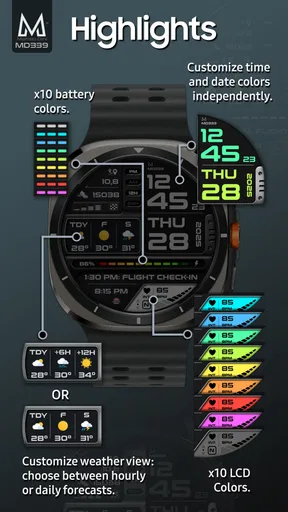
 Analysis by AppCompare
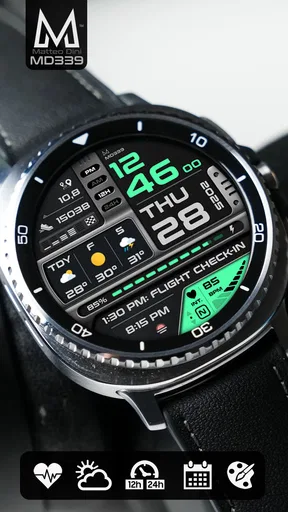
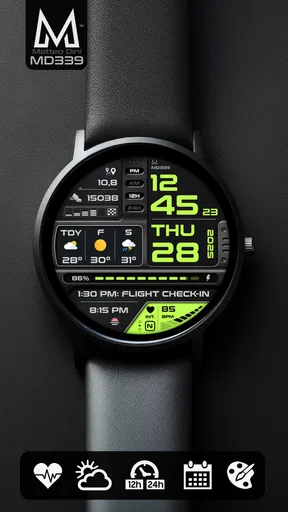
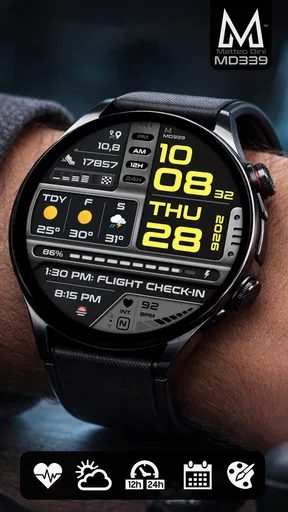
I tend to judge a watch face by what it helps me do between glances, not by how impressive it looks in a store preview. MD339 Digital takes that practical route: it is a paid personalization app built around a digital watch face with weather, health information, and complications. After using it, I see it as a good fit for someone who wants a data-focused smartwatch display rather than a decorative design.
The app comes from Matteo Dini MD ® Watch Faces, a developer known here for concentrating on watch-face design rather than trying to turn the phone into an all-purpose utility. Its current average is 4.4 from around 430 ratings, with more than 10K installs. Those figures suggest a modest but established audience, and the Everyone age rating makes the product broadly suitable from a content perspective. It costs $2.99, so the decision is less about accepting advertising or creating an account and more about deciding whether this particular layout deserves space on your watch.
How MD339 Digital works in a shared household
The most useful way to think about this app in a household is as a personal display, not a family dashboard. If several people share a phone, tablet, or charging area, the watch face itself still belongs to the person wearing the compatible watch. Weather, health details, and complications are meaningful only when they are connected to that wearer’s watch setup and information sources.
That distinction matters more than it first appears. A partner, child, or parent may glance at the watch while asking what the weather is or whether a scheduled item is visible, but the face should not be treated as a shared status board. The health information is especially personal. I would be comfortable showing someone the time or weather, but I would not assume that every household member should see the health fields simply because the watch is sitting on a table.
In a realistic morning routine, I can imagine putting the watch on before leaving, checking the weather without opening the phone, and using a complication for the information I personally check most often. Later, another person in the home might borrow the phone to adjust something, but that does not make the watch face a communal account. Keeping that mental boundary prevents confusion about whose data is being displayed.
This also makes the design more useful for people who live with others but want a quick private reference on their wrist. The face can reduce the need to ask another person for the forecast or open a shared device just to check a basic detail. At the same time, it does not replace household communication. If plans change, everyone still needs a normal message or conversation rather than relying on a glance at one person’s wrist.
What the information-heavy layout is good at
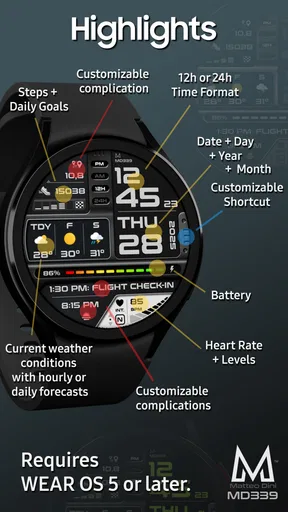
The main strength is density. Weather, health data, and complications place several kinds of information close together, which suits me when I want the watch to act as a compact dashboard. I do not have to move from a purely decorative screen into an app every time I want a quick piece of context.
Worth Reading Before You Choose

EA SPORTS FC Mobile 26 Is a Bigger Football Game, but It Takes Time

Flipboard Shows What News Apps Must Do Beyond the Feed

Switching to Android Auto Means Rethinking Your Driving Routine

Google Calendar Makes a Crowded Week Easier to Manage

Ludo King Makes the Most of the Minutes Between Plans

Baby Panda World Brings Quick Play to Modern Phones, but Its Game Library Feels Busy
That approach is particularly helpful during transitions: leaving home, commuting, starting exercise, or deciding whether to take an extra layer. A weather field can answer an immediate question, while health-related fields provide a quick sense of the day. Complications add another layer of personalization by letting the watch face surface information from the watch ecosystem instead of forcing every task through the phone.
There is a trade-off, though. More information means more visual competition. A minimalist face can be understood instantly because the time dominates everything else. MD339 Digital asks me to learn where its different areas are and decide which details deserve attention. Users with weaker eyesight, small watch displays, or a strong preference for uncluttered design may find the information-rich approach less comfortable.
My practical advice is to begin with only the complications I genuinely use. If every available space is filled, the face can become a collection of tiny reminders rather than a calm glanceable tool. The best result comes from treating the layout as a prioritization exercise: keep the time and one or two high-value data points prominent, then add secondary information only if it remains easy to read.
Setup boundaries before anyone else uses the device
A shared phone introduces a simple but important boundary: the person installing or configuring the face should be the person who understands the watch’s connection and personal data. I would not hand the phone to a child or guest and ask them to choose health-related fields without checking what the watch is actually displaying.
The app’s role is personalization, so the setup experience is best approached as a watch-owner task. I would install it from the relevant app store, apply the face through the watch’s normal face-management process, and then inspect each visible area while wearing the watch. That last step is easy to skip, but it matters because a field that looks useful in a preview may be too small, too busy, or less relevant in daily use.
I would also configure it in the environment where the watch will normally be worn. Indoor lighting, outdoor glare, and movement can change how quickly I can read a digital face. A setup that looks perfect while sitting at a desk may feel less successful while walking outside. Checking the display during an ordinary morning is more revealing than judging it only from a static screen.
For shared-device households, I recommend keeping the watch owner’s store account and wearable connection separate from casual phone use. That is not a special family-control feature; it is simply good account hygiene. A person borrowing the phone should not need access to the owner’s personal configuration just to check the time, and the owner should know which account is responsible for the purchase and installation.
The $2.99 price also makes the account question worth settling before purchase. If two people own separate watches, I would not assume that buying the face once automatically means it can be freely moved between unrelated accounts or devices. I would treat the purchase as belonging to the account used in the store and verify the platform’s normal purchase and compatibility rules before planning a multi-watch household setup.
Coordinating information without turning the watch into a family system
MD339 Digital can support coordination indirectly, but it should not be oversold as a coordination tool. Complications may help the wearer keep a personal schedule or another frequently checked item within reach, while weather can make departure decisions easier. That is useful when one person is organizing a school run, commute, appointment, or outdoor activity.
Still, the face does not create a shared plan by itself. If I am responsible for getting everyone out of the house, I can use my watch as a personal prompt, but I would not expect another household member to see the same information on their own device. The practical workflow is to use the watch for my own glanceable details and a shared calendar, message, or spoken reminder for group coordination.
One non-obvious benefit of this separation is reduced accidental disclosure. A household can coordinate without placing everyone’s health information or personal complications on a common screen. I can choose a complication that helps me while leaving other family members’ devices untouched. That makes the face more appropriate for mixed households than a design that assumes everyone wants the same information visible.
There is also a useful discipline in assigning each complication a job. I would reserve one area for something that helps me act now, such as weather, and another for information that helps me plan. If both areas show similar details, the display becomes redundant. A face with fewer but better-chosen fields is more useful than one that technically exposes many options but demands too much interpretation.
Age, trust, and personal information
The Everyone rating refers to the app’s content suitability, not to every possible use of the information shown on a watch. A child can look at a digital time display without a problem, but health fields remain personal context. Parents or guardians should decide whether a child’s wearable data should be visible to siblings, visitors, or anyone borrowing the phone.
I would also explain to younger users that a watch face is not a medical authority. Health data can be useful for everyday awareness, but a glance at a complication should not become a diagnosis or a reason to panic. The face is designed to surface information conveniently; it does not change the meaning or limitations of the underlying measurements.
Trust works both ways in a shared home. The wearer should know what is displayed, and other people should understand that looking at the watch is not permission to inspect every personal field. If the watch is often left unattended, I would choose visible complications with care. Weather and time are broadly harmless; personal health details may deserve a more private arrangement.
This is one area where a simpler alternative may be better. If the watch is regularly passed between family members, a basic time-focused face avoids awkward questions about whose data is shown. MD339 Digital makes more sense when one person has consistent ownership and wants a richer personal dashboard. Its strengths depend on that clear relationship between wearer, device, and information.
Where it stands against simpler watch-face alternatives
Compared with a standard digital face, this app offers a stronger reason to glance at the watch beyond reading the time. Weather, health data, and complications can reduce the number of times I reach for the phone. The extra information gives the face a more purposeful character and makes the purchase easier to justify for people who regularly use those fields.
Compared with a highly decorative watch face, MD339 Digital is less about changing the mood of the watch and more about making the display useful. Someone choosing a face to match an outfit, imitate an analog dial, or create a very quiet screen may prefer another style. This design is aimed at people who like information close at hand.
It also differs from a phone-based weather or health app because the value comes from immediacy. I do not need to unlock a device and navigate through a screen for every glance. The limitation is that the watch face cannot offer the same depth as opening the full app behind a complication. It is a front door to information, not a replacement for detailed review.
That trade-off helps define the right buyer. If I check weather several times a day, monitor a small set of health indicators, and appreciate quick access to complications, the layout earns its place. If I rarely look at anything except the time, a free or simpler face is probably the more sensible choice, even at this relatively modest purchase price.
Small habits that make the face more effective
My first tip is to evaluate the display after a full day rather than immediately after installation. A face can feel exciting because it is new, but daily usefulness comes from whether I can read the important fields while moving. I would notice which areas I instinctively check and which ones I ignore, then simplify my arrangement around that behavior.
My second tip is to separate urgent information from background information. Weather can influence what I do next, while a health figure may be useful as a trend or reference. Treating both as equally urgent creates unnecessary visual pressure. I prefer a layout where the information that changes my immediate decision is easiest to locate.
My third tip is to test the face during household handoffs. If another person occasionally handles the watch or phone, I would make sure the owner can still identify the personal fields and that nobody mistakes them for shared household information. This is especially valuable when a watch is charged in a common room or used around children.
A fourth useful habit is to review the complications after changing routines. A field that made sense during a workweek may be less useful on weekends, while an outdoor activity can make weather more important. The face becomes more valuable when its visible information follows my actual day instead of remaining fixed out of habit.
Who should choose it, and who should pass
I would recommend MD339 Digital to a smartwatch owner who wants a practical digital display and enjoys customizing what appears at a glance. It is especially suitable for someone who regularly checks weather, health information, and complications, and who is willing to spend a few minutes arranging the face around real priorities.
I would be more cautious if the watch is mainly a shared household object. The app does not turn personal data into a family view, and the health-related areas make ownership boundaries important. A neutral, time-first face is easier when several people handle the same device or when privacy expectations are unclear.
I would also skip it if I strongly prefer visual simplicity. The appeal here comes from information density, so the same quality that helps one user can bother another. People who want a large, isolated time display, a traditional analog appearance, or a purely decorative design should look elsewhere rather than trying to force this face into that role.
Compatibility and installation should be checked on the device before purchase through the normal store and wearable setup process. That is a sensible step for any paid watch face, particularly when more than one watch or account is involved. The price is reasonable for an app I use every day, but it is still better to confirm that it fits the intended watch and account arrangement first.
My household verdict
After looking at it as both a personal watch face and a shared-device household choice, I find MD339 Digital strongest when one person clearly owns the watch and wants a compact information panel. The weather, health data, and complications give it more daily purpose than a basic clock, while the digital presentation keeps the focus on quick reading.
Its limitations are mostly about fit rather than missing ambition. A busy display can demand more attention than a minimalist alternative, and personal fields require sensible boundaries when relatives share phones, rooms, or devices. The app supports individual awareness; it should not be treated as a substitute for family controls, shared planning, or a household information system.
For my own use, I would buy it when I wanted the watch to answer several small questions without opening the phone. I would configure only the fields I actually consult, keep health information personal, and explain to other household members that the display belongs to the wearer. With those expectations in place, MD339 Digital feels like a focused personalization purchase rather than a flashy novelty.
Overall, the 4.4 average and growing audience are consistent with an app that has a clear purpose: giving a compatible smartwatch a more informative face. It is not the universal choice for every wearer, but for someone who values weather, health context, and carefully selected complications in one glance, it is a worthwhile $2.99 upgrade.
Pros
- Clean digital layout makes the time easy to read at a glance.
- Supports useful complications for weather
- steps
- battery
- and other data.
- Multiple color and style options allow some personalization.
- Designed for Wear OS and works well on compatible round displays.
- Uses a modern
- sporty look suitable for everyday wear.
Cons
- Compatibility may vary between Wear OS watches and smartphone models.
- Some features or customization options may require a paid version.
- Small complications can be difficult to read on compact watch screens.
- The bold digital style may not suit users seeking a classic analog face.
- Battery impact may depend on how often complications update.
FAQs for MD339 Digital watch face
What is MD339 Digital watch face?
MD339 Digital watch face is a customizable digital watch face designed for compatible Wear OS smartwatches. It focuses on clear, modern information display, typically showing the time alongside useful details such as the date, battery level, and other watch data. Its exact appearance and available functions may vary depending on the watch model, Wear OS version, and the configuration options provided by the developer.
Which smartwatches are compatible with MD339 Digital watch face?
Before downloading, check that your smartwatch runs a supported version of Wear OS and that the watch face is listed as compatible with your specific device. Compatibility can differ between watches, especially older models and devices using proprietary operating systems. The installation page should identify supported platforms, while your phone and watch must also be correctly paired for the face to install and appear in the watch-face selection menu.
Can I customize the MD339 Digital watch face?
MD339 Digital watch face is intended to provide personalization options, although the available controls depend on the version installed and your smartwatch. Users may be able to change colors, complications, display elements, or other visual settings through the watch-face editor or the companion installation process. Some options may only be available on certain devices, so review the preview and listed features before downloading.
Does MD339 Digital watch face affect battery life?
Like any active smartwatch face, MD339 Digital can use a small amount of additional battery power, particularly when it includes animated elements, frequently updated complications, or sensors and connectivity data. A simple digital layout is generally less demanding than a highly animated design, but real-world consumption depends on your watch, screen technology, brightness, and usage. If battery life changes noticeably, reduce complications or disable unnecessary features.
How do I install and use MD339 Digital watch face?
Install MD339 Digital from the official store or the developer’s authorized download page, ensuring that the selected account and smartwatch are correctly connected. After installation, open the watch-face picker on your Wear OS watch or use the phone’s wearable application to select it. If it does not appear immediately, synchronize the devices, restart the companion app, and confirm that the watch meets the stated compatibility requirements.


